Python Pitfalls: How to Secure Your Code Part 3
Recently I watched a presentation by Alex Brumen aka Brumens who is an ethical hacker, developer, bug bounty hunter, and currently a researcher enablement analyst at YesWeHack. Brumens gave a presentation and wrote an article on python’s pitfalls and how to ethically exploit them. In this post we’ll be using code snippets similar to those in Brumen’s article and showcase how we can secure them to prevent these pitfalls. I would highly recommend you watch Brumen’s presentation or read the article linked above. You can find part 1 and 2 of this article here and here.
class pollution
Class pollution in python is a vulnerability that allows an attacker to modify class variables which could result in file access or remote code execution (RCE). One way class pollution in python occurs is when setattr is used on untrusted user input. In the example code I’ve written I’ve used a standard recursive function that uses setattr to set a variable’s value, in the example I’m instantiating a Dog class and re-assigning the name value.
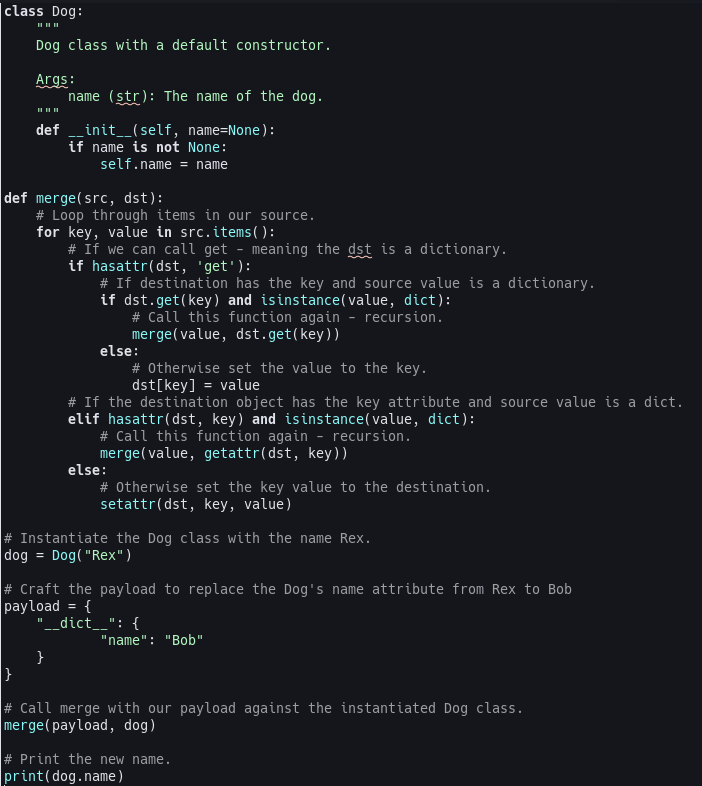

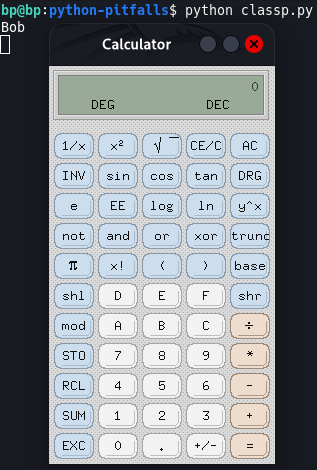
From the screenshot above you can see we were able to change the value of dog.name to be Bob using class pollution. To further prove how dangerous class pollution is, below is a screenshot of a payload opening the calculator app on my machine after running the same code with an extra payload. Although these types of vulnerabilities are rare, and as I’ve demonstrated, they are still possible.
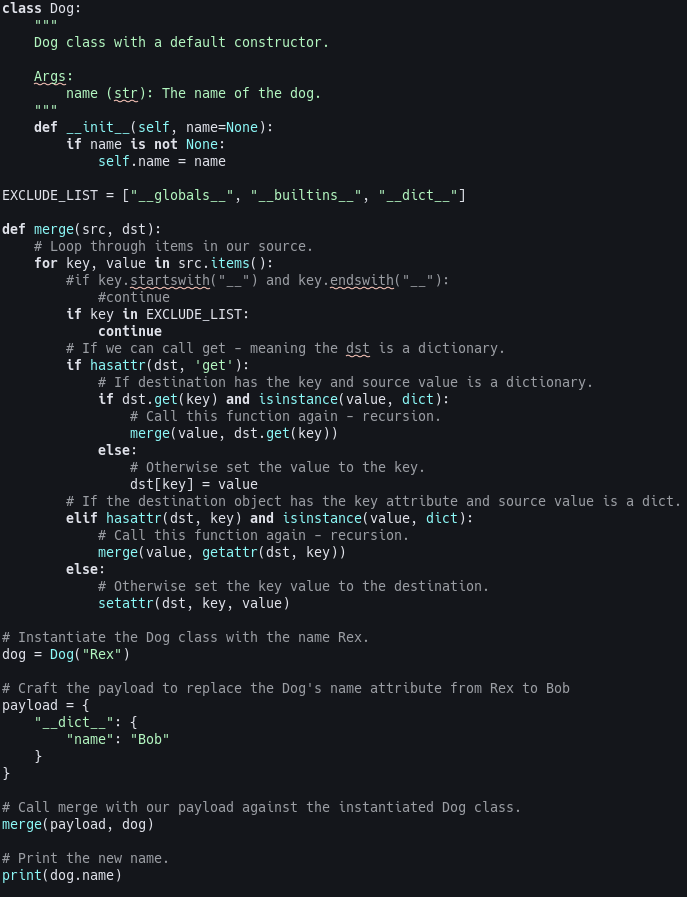
So how do we protect against this vulnerability? An effective way is to sanitize the property keys. This means you strip out or disallow any __ from the user’s input or implement a forbidden key list with values like __globals__ or __builtins__. The example below shows the fix in the code. I’ve included both checks in the example, the one that is commented out is just checking for __ at the start and end of the key. The second one is checking if the key is in the excluded list. Our code is only using __dict__ but I’ve also included __globals__ and __builtins__ in the exclude list as part of the example. Below you’ll also find the code being run and the name of the dog going unchanged.

urllib.parse.urljoin
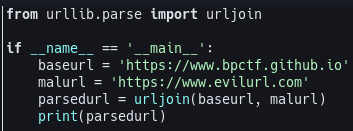
urllib.parse.urljoin suffers from the same security problem as os.path.join. When passing two URLs to urllib.parse.urljoin if the second URL passed is a full URL then all previous segments are ignored. This is the warning present on the urllib.parse.urljoin documentation.
Warning
Because an absolute URL may be passed as the url parameter, it is generally not secure to use urljoin with an attacker-controlled url. For example in, urljoin(“https://website.com/users/”, username), if username can contain an absolute URL, the result of urljoin will be the absolute URL.
In the piece of code below using urllib.parse.urljoin I am joining two absolute URLs and printing the result to showcase the vulnerability.

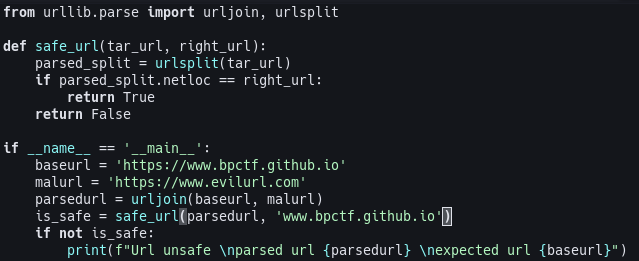
To secure this code we need to create a function that will compare the URLs components created by urllib.parse.urlsplit to the base URL we are using in urllib.parse.urljoin without the scheme. urllib.parse.urlsplit returns a SplitResult object which is similar to a list. It contains all the parts of a general URL as follows: scheme://netloc/path?query#fragment. With the SplitResult object we compare the netloc with a URL in the format of www.compareurl.com and if it matches the SplitResult netloc object, it’s a safe URL and it isn’t a dangerous URL or an SSRF (server-side request forgery) attempt.

This ends the second part of Python Pitfalls: How to Secure Your Code. These functions are widely used in python projects and could be easily exploited by bad actors so knowing how to secure your code is vital to prevent it. Make sure to always read the documentation of functions you’re using in production code!