Python Pitfalls: How to Secure Your Code Part 2
Recently I watched a presentation by Alex Brumen aka Brumens who is an ethical hacker, developer, bug bounty hunter, and currently a researcher enablement analyst at YesWeHack. Brumens gave a presentation and wrote an article on python’s pitfalls and how to ethically exploit them. In this post we’ll be using code snippets similar to those in Brumen’s article and showcase how we can secure them to prevent these pitfalls. I would highly recommend you watch Brumen’s presentation or read the article linked above. You can find part 1 of this article here
pickle.loads
Pickle.loads is known for not being a secure module. When viewing the python docs for pickle there is a warning directly near the top of the page which states:
Warning: The pickle module is not secure.
It is possible to construct malicious pickle data which will execute arbitrary code during unpickling. Never unpickle data that could have come from an untrusted source, or that could have been tampered with.
The piece of code below shows how a bad actor can exploit the pickle.loads function to print the contents of the /etc/passwd file.
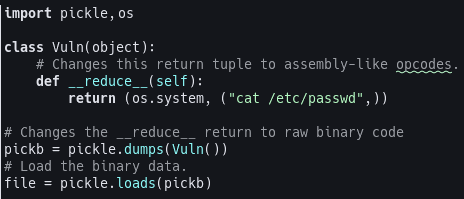
Now imagine if we were to get user input in a production release that would then use pickle.loads to run that user input, it could be a security disaster. So, how do we secure this? The best way to secure this is to not use pickle.loads if you can. Using JSON as an alternative for user input or external APIs is the better option, as stated in the pickle documentation. Another option, stated in the pickle documentation, is to sign the data using hmac. Here’s how the code will look like:
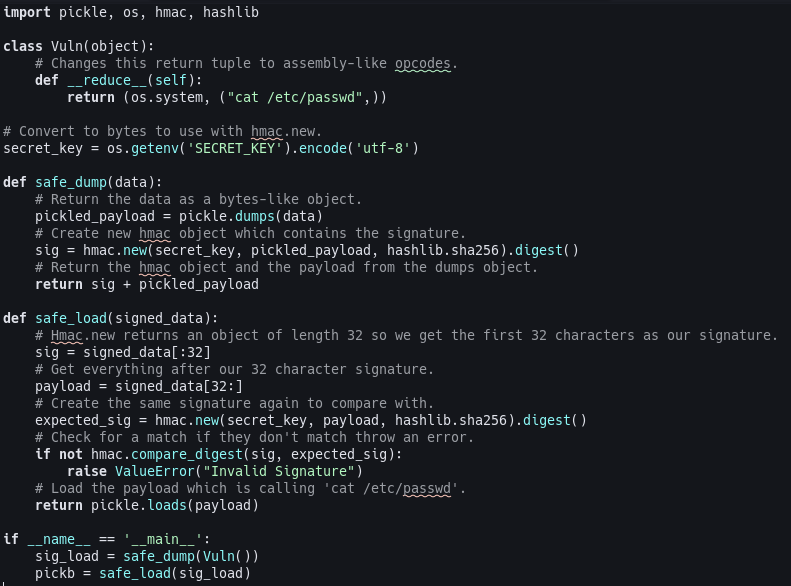
This code will run the pickle.loads on our command because it is signed, preventing other commands from being run unless the attacker has our key. In this example our key is an environment variable which prevents it from being in the code base.
A second way to secure the code is to inherit the pickle.Unpickler class and override the find_class function to whitelist module/classes and to block dangerous ones. In the example below I allow the use of os.system and posix.system. The reason we allow posix.system is because when Linux calls os.system it points to posix.system behind the scenes. We also allow builtins and tuple to allow us to use the __reduce__ function which returns a tuple. In the code below if you uncomment the commented code and comment out the return above and run the code you’ll see an error is thrown because builtins.eval is forbidden.
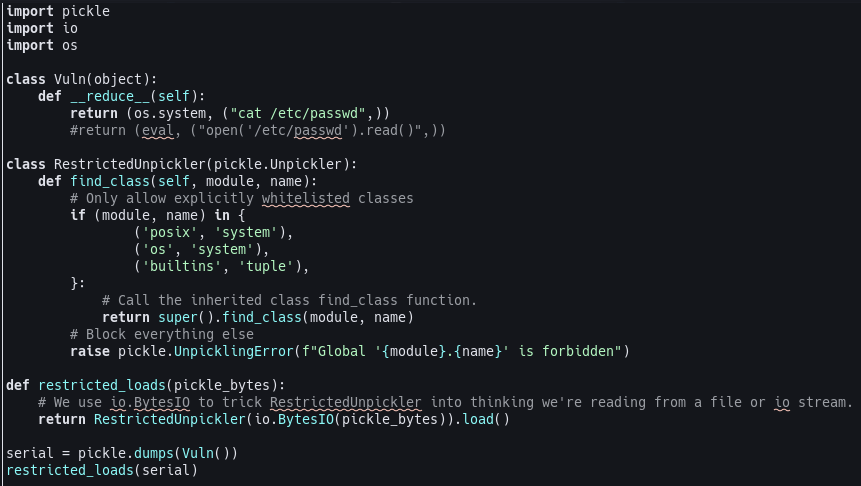
As stated earlier and in the pickle documentation the best approach is to use JSON for the use of any untrusted data and to forego using pickle.loads. Using functions like json.dumps() and json.loads() after filling in a json file with the user provided data.
yaml.load
Similar to pickle.loads yaml.load is also unsafe to use and should not be trusted with any untrusted data. On the pyyaml documentation it states:
Warning: It is not safe to call yaml.load with any data received from an untrusted source! yaml.load is as powerful as pickle.load and so may call any Python function. Check the yaml.safe_load function though.
So if we were to have a piece of code that will display the id linux command yaml, like pickle, would execute it. So a way to compromise a piece of yaml code could be done like so:
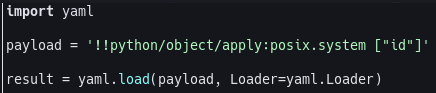
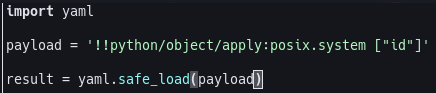
Running that code will run the id command. A way to secure this code is to use the yaml.safe_load() function. This will prevent yaml from running our payload. So if you replaced the yaml.load() function in our code with yaml.safe_load() it would error out, rightfully so.
This ends the second part of Python Pitfalls: How to Secure Your Code. These functions are widely used in python projects and could be easily exploited by bad actors so knowing how to secure your code is vital to prevent it. Make sure to always read the documentation of functions you’re using in production code!