Leg Pwnable.kr

I will be walking through the pwnable.kr CTF called “leg” which can be found here. When clicking on the CTF (seventh one from the left - same image as the one attached to the article) you’ll see it mentions “ARM architecture”. What is ARM architecture?
Before We Get The Flag
What Is ARM Architecture
ARM architecture in regards to assembly differentiates from Intel due to the fact that ARM focuses on using general-purpose registers to store and load memory access and focuses on efficient simple fixed instructions. Whereas Intel focuses on complex instructions that can directly manipulate memory and focuses on raw performance. This is a simple and quick explanation and you’ll see the difference in the assembly instructions when we analyze the assembly code, but you can read more about it here!.
leg Code
Understanding The Code
Now that you’re somewhat familiar with ARM architecture and how it differs from Intel we can move onto working on this CTF. Following the instructions on the site we are going to the links shown for the leg.c file and the leg.asm file. We will be focusing on the C code and jump to the assembly code when we need to.
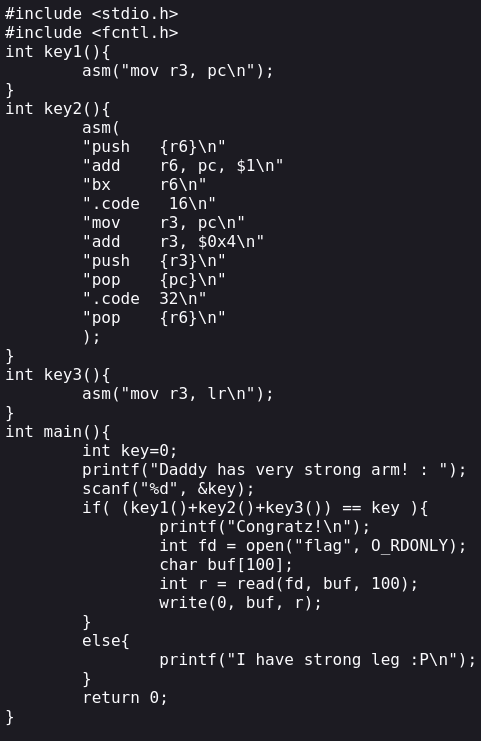
Now lets break down what’s happening in this C code. I’m not going to go over everything line by line, but I’ll point out the important parts and explain them as best as I can.
key1()asm("mov r3, pc\n");: This is calling ARM assembly code in c which is moving the value ofpctor3. The value ofpcis the address of thatmovcall + 8.
key2()"mov r3, pc\n": This is doing the same as above, just moving the value ofpctor3."add r3, $0x4\n": This is adding 4 to the value ofr3.
key3()asm("mov r3, lr\n");: This is moving the value oflrintor3. The value oflris the address of the return function that calls this. In this case it would be the address ofkey3().
main()if( (key1()+key2()+key3()) == key ): Due tokey1()andkey3()using the value fromr3we need to find ther3values from all the functions which I’ve outlined above. Once all those values are added if they equal tokey, which is a key input by the user, then we can read the flag.
What We Know
Now that we understand the code and understand what these ARM calls are doing we can try to figure out how to pass the appropriate key value. What do we know?
- We need to supply a value for
keythat equals all 3key()functions return values forr3. - We need to access the
.asmfile to see specific addresses forlrandpc.
This challenge is quite easy once you know how these ARM function calls work and what values are getting placed into our registers. So with that we’ll take a look at the assembly and do some math to get our key so we can get our flag.
The Flag And How To Get it
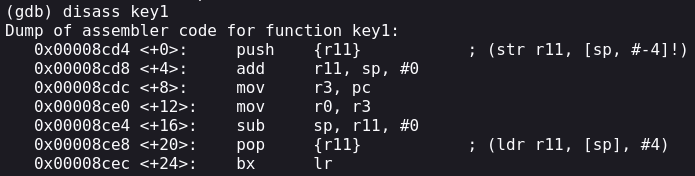
Looking at the first key1() function which is calling asm("mov r3, pc\n"); where we need to find the value of pc. As I’ve stated above, the value of pc is the address of the original call +8. So in this case the address of the mov call + 8. Looking at the assembly we see the address of mov to be 0x00008cdc so if we add 8 to that we get 0x00008CE4 which has a decimal value of 36068. So this is the first number we need to remember.
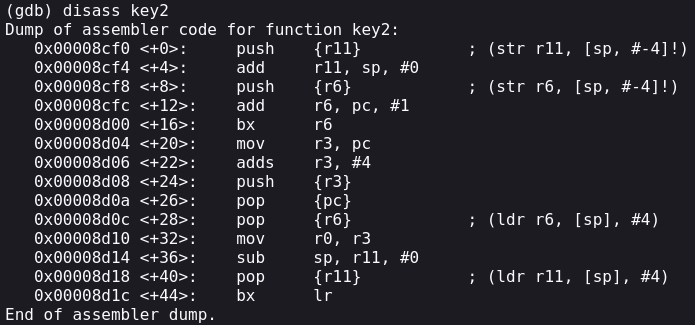
The second number we need is to find the address of "mov r3, pc\n". Looking at the .asm file we can see the address is 0x00008d04 and if we add 8 to that we get 0x00008D0C. So r3 is equal to 0x00008D0C and the next instruction is "add r3, 0x4\n" so we need to add 4 to r3 which is 0x00008D0C + 4 = 0x00008D10 which is 36112. So that is our second number we need to remember.
The third number we need is to is find the address of key3() because of the call inside the function which assigns the value of lr to r3 as seen here asm("mov e3, lr\n");. The address of the key3() function is 0x00008d7c as seen on the .asm file. 0x00008d7c converted to a decimal is 36220. This is the third number we will need to remember.
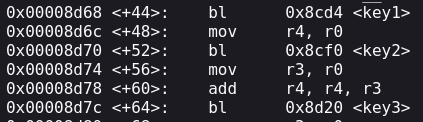
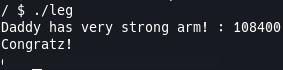
With all 3 numbers we can add them to see what value we get and then we can go ahead and pass that to the ./leg file after we ssh and get the flag! 36068 + 36112 + 36220 = 108400. So if we pass this value when prompted by the executable we should get our flag. Following the instructions on the site we are going to ssh into the machine with the following command: ssh leg@pwnable.kr -p2222 and once prompted provide the password provided by the CTF. Once we’re logged in we can run ./leg and when prompted provide the program with 108400 and we should get our flag!