Input2 Pwnable.kr

I will be walking through the pwnable.kr CTF called “input2” which can be found here. When clicking on the CTF (sixth one from the left - same image as the one attached to the article) you’ll see it asks “how can I pass input to a computer program?”, we’ve done this before so this should be fun.
Before We Get The Flag
Args
If you’ve followed any of my other write-ups we’ve mentioned argc and argv a few times. I’ve even explained it briefly in the File Descriptor write-up. When writing a program that will require arguments from the user it’s important you know that in languages like Python and C/C++ the first argument is reserved for the running of the executable. For example, if I have a C executable called input2 and I need to pass it an argument, lets say 123, the code in the executable would check if the user has passed less than 2 arguments, and if they have they will display a message or just exit. Here is an example of the code:
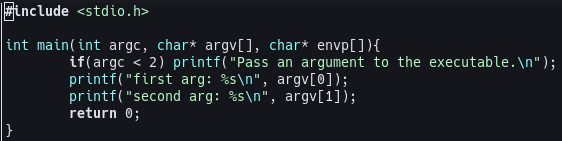
Running the above code, after compiling it and outputting the file to input2test, with ./input2test will print Pass an argument to the executable.. Now if you were to do ./input2test 123 then you would get no feedback, meaning it worked. The reason it works is because ./input2test is an argument so that will count as 1, and then 123 is the second argument, which would make the argc integer equal to 2 thus allowing the program to run. As the above code shows it is possible to also access the arguments passed to the executable by accessing the argv[] list. argv[0] will print ./input2test and argv[1] will print 123.
input2 Code
Understanding The Code
Now that you’re familiar with how args work in C we can move onto working on this CTF. Following the instructions on the site we are going to ssh into the machine with the following command: ssh input2@pwnable.kr -p2222 and once prompted provide the password provided by the CTF. Once in the machine we can run the ls command and see that we get 3 files back flag input2 input2.c. If we try cat flag you’ll see that we get a Permission denied error.
Tip: It’s always good to do the obvious first, which in this case is
cat flag. Sometimes the task at hand is as easy as reading the flag so it never hurts to try the obvious first. Also good for testing any software/configuration to weed out any potential bugs.
So then we have input2 input2.c left. input2 is the executable file compiled from the input2.c file. So lets take a look at the input2.c file and see what is going on in there. Here is my terminal, if you’ve been following along yours should look the same: 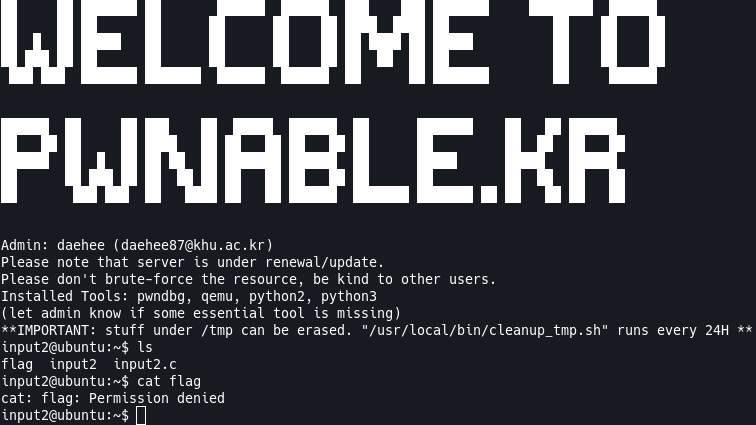
1
2
3
4
5
6
7
8
9
10
11
12
13
14
15
16
17
18
19
20
21
22
23
24
25
26
27
28
29
30
31
32
33
34
35
36
37
38
39
40
41
42
43
44
45
46
47
48
49
50
51
52
53
54
55
56
57
58
59
60
61
62
63
64
65
66
67
68
69
#include <stdio.h>
#include <stdlib.h>
#include <string.h>
#include <sys/socket.h>
#include <arpa/inet.h>

int main(int argc, char* argv[], char* envp[]){
	printf("Welcome to pwnable.kr\n");
	printf("Let's see if you know how to give input to program\n");
	printf("Just give me correct inputs then you will get the flag :)\n");

	// argv
	if(argc != 100) return 0;
	if(strcmp(argv['A'],"\x00")) return 0;
	if(strcmp(argv['B'],"\x20\x0a\x0d")) return 0;
	printf("Stage 1 clear!\n");

	// stdio
	char buf[4];
	read(0, buf, 4);
	if(memcmp(buf, "\x00\x0a\x00\xff", 4)) return 0;
	read(2, buf, 4);
  if(memcmp(buf, "\x00\x0a\x02\xff", 4)) return 0;
	printf("Stage 2 clear!\n");

	// env
	if(strcmp("\xca\xfe\xba\xbe", getenv("\xde\xad\xbe\xef"))) return 0;
	printf("Stage 3 clear!\n");

	// file
	FILE* fp = fopen("\x0a", "r");
	if(!fp) return 0;
	if( fread(buf, 4, 1, fp)!=1 ) return 0;
	if( memcmp(buf, "\x00\x00\x00\x00", 4) ) return 0;
	fclose(fp);
	printf("Stage 4 clear!\n");

	// network
	int sd, cd;
	struct sockaddr_in saddr, caddr;
	sd = socket(AF_INET, SOCK_STREAM, 0);
	if(sd == -1){
		printf("socket error, tell admin\n");
		return 0;
	}
	saddr.sin_family = AF_INET;
	saddr.sin_addr.s_addr = INADDR_ANY;
	saddr.sin_port = htons( atoi(argv['C']) );
	if(bind(sd, (struct sockaddr*)&saddr, sizeof(saddr)) < 0){
		printf("bind error, use another port\n");
    return 1;
	}
	listen(sd, 1);
	int c = sizeof(struct sockaddr_in);
	cd = accept(sd, (struct sockaddr *)&caddr, (socklen_t*)&c);
	if(cd < 0){
		printf("accept error, tell admin\n");
		return 0;
	}
	if( recv(cd, buf, 4, 0) != 4 ) return 0;
	if(memcmp(buf, "\xde\xad\xbe\xef", 4)) return 0;
	printf("Stage 5 clear!\n");

	// here's your flag
	setregid(getegid(), getegid());
	system("/bin/cat flag");
	return 0;
}
Now lets break down what’s happening in this C code. I’m not going to go over everything line by line, but I’ll point out the important parts and explain them as best as I can. I’m going to do this in sections based on their comments.
// argv: If the conditions below are met appropriately then we pass stage one!if(argc != 100) return 0;: If the number of arguments we pass to the executable does not equal 100, exit.if(strcmp(argv['A'],"\x00")) return 0;: If theargv['A']does not equal\x00, exit.argv['A']is equal to65in C because the character literals have integer values. So if you didint num = 'A'; printf("%d", num);you’d get65back.if(strcmp(argv['B'],"\x20\x0a\x0d")) return 0;: Similar above, if'A'is65in C, then'B'is66. Ifargv['B']orargv[66]is not equal to\x20\x0a\x0dthen exit.
// stdio: If the conditions below are met appropriately then we pass stage two!char buf[4];: Declare a char array with a size of 4.read(0, buf, 4);: Read 4 bytes from the 0 file descriptor (stdin) and put it into the buffer.if(memcmp(buf, "\x00\x0a\x00\xff", 4)) return 0;: If the value ofbufis not equal to\x00\x0a\x00\xffthen exit.read(2, buf, 4);: Read 4 bytes from the 2 file descriptor (stderr) and put it into the buffer.if(memcmp(buf, "\x00\x0a\x02\xff", 4)) return 0;: If the value ofbufis not equal to\x00\x0a\x02\xffthen exit.
// env: If the condition below is met appropriately then we pass stage three!if(strcmp("\xca\xfe\xba\xbe", getenv("\xde\xad\xbe\xef"))) return 0;: If there is an environment variable with the name of\xde\xad\xbe\xefand does not have a value of\xca\xfe\xba\xbethen exit.
// file: If the condition below is met appropriately then we pass stage four!FILE* fp = fopen("\x0a", "r");: Open a file with the name of\x0aas read-only.if(!fp) return 0;: If we weren’t able to open the file (file does not exist) then exit.if( fread(buf, 4, 1, fp)!=1 ) return 0;: Read 1 item, 4 bytes, into thebufvariable from the opened file. If 1 item, 4 bytes, is not read from the file exit.if( memcmp(buf, "\x00\x00\x00\x00", 4) ) return 0;: If the 4 bytes we read into thebufvariable is not equal to\x00\x00\x00\x00then exit.
// network: If the condition below is met appropriately then we pass stage five!int sd, cd;: Declare 2 integers.struct sockaddr_in saddr, caddr;: Declare two structs of typesockaddr_in.sd = socket(AF_INET, SOCK_STREAM, 0);: Assignsdto a socket object.AF_INETis just IPv4 internet protocols.SOCK_STREAMspecifies reliable connection based byte streams (think TCP).0the protocol value for Internet Protocol (IP).if(sd == -1): If we were unable to create a socket, print an error message and exit.saddr.sin_family = AF_INET;: Specifying IPv4 for socket communication similar to above.saddr.sin_addr.s_addr = INADDR_ANY;: Allows a user to connect on any local address.saddr.sin_port = htons( atoi(argv['C']) );: Set the port for the socket equal to the value ofargv['C']orargv[67]and change it from a string to an int (atoi).htonswill change the value of the port to big-endian.if(bind(sd, (struct sockaddr*)&saddr, sizeof(saddr)) < 0: If we cannot assign an address and port to our socket then print an error message and exit.listen(sd, 1);: Listen for any incoming connections on the ip address and port specified earlier when creating the socket.cd = accept(sd, (struct sockaddr *)&caddr, (socklen_t*)&c);: Accept an incoming connection to the socket.if(cd < 0): If there was an issue accepting a connection print an error and exit.if( recv(cd, buf, 4, 0) != 4 ) return 0;: If the data we received is not 4 bytes then exit.if(memcmp(buf, "\xde\xad\xbe\xef", 4)) return 0;: If the data we received does not equal\xde\xad\xbe\xefthen exit.
What We Know
Now that we understand the code and understand what needs to be done in C we can try to figure out how to extract the flag. What do we know?
- We need to pass
100arguments to our executable and arguments65, 66, 67need to be specific values. - We need to pass input to the
stdinandstderr. - We need to have an environment variable available when the executable is ran.
- We need to have a file along side the executable with a specific name and specific content in it.
- We need to connect to a socket and send it a specific 4 byte sequence.
With this information we can get the flag. We won’t need gdb for this task, but we will need to go into the /tmp folder and create a script to run this since we can’t run it through the command line.
Get The Flag
Now that we know what we need to get the flag, we’ll need to go into the /tmp folder so we can write and run our python script because we can’t do it in the home folder. So I’ll navigate there and create a folder.
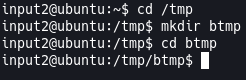
Once in there we can use vim input.py to open an editor, press i to enter INSERT MODE and we can start writing our code. The first thing we need to do is supply 100 arguments when we run the executable with argv[65] and argv[66] need to be specific values of \x00 and \x20\x0a\x0d respectively. We will also pass port 4444 to argv[67] for our socket for later. We can do that with the following code.
1
2
3
4
5
6
7
8
9
10
11
12
13
14
15
# Our first arg is the file we're executing because pwn requires this as an arg.
args = ["./input2"]
# Loop through 99 times and append "A" to our args.
# This is because we need to pass 99 A's to the executable.
# Our ./input2 arg is the 100th arg.
for x in range(1, 100):
  args.append("A")
# The code in this ctf says that argv['A'] needs to be \x00.
# argv['A'] is equal to argv[65] because A's int value is 65.
args[65]="\x00"
# Argv['B'] = argv[66] and it needs to be \x20\x0a\x0d.
args[66]="\x20\x0a\x0d"
# Argv['C'] = argv[67] and it needs to be a string for our port.
# because the C code calls atoi it will convert it to an int.
args[67]='4444'
Next we need to pass input to the stdin and stderr. We can do that with the following code.
1
2
3
4
5
6
# We need to write to the stdin and stderr so we create readers and writers.
r1, w1 = os.pipe()
r2, w2 = os.pipe()
# Write to the stdin and stderr which is awaiting these specific values.
os.write(w1, b"\x00\x0a\x00\xff")
os.write(w2, b"\x00\x0a\x02\xff")
Next we need to pass an environment variable, so we’ll set that and call the process to pass it and all the code above as well.
1
2
3
4
5
6
# The executable is going to look for an environment variable
# We pass it to the process so it will create the environment variable
# for us.
myenv = {"\xde\xad\xbe\xef": "\xca\xfe\xba\xbe"}
# Run the input2 executable and pass it the necessary params.
p = process(executable="./input2", argv=args, env=myenv, stdin=r1, stderr=r2)
Next we need to create and write 1 line of 4 bytes to a file with a specific name. We can do that with the following code.
1
2
3
4
# Create a file as the executable will try to read this
with open("\x0a", "w") as f:
  # Fill it with the required data
  f.write("\x00\x00\x00\x00")
Lastly, we need to connect to the socket with a port of our choosing and send a specific 4 byte message. We can do that with the following code.
1
2
3
4
5
6
7
8
# Since I'm using pwn I might as well keep using it.
# Use pwn's remote to connect to a socket and send it the required data.
# Then close it because we clean up after ourselves here.
conn = remote('localhost', args[67])
conn.send(b"\xde\xad\xbe\xef")
conn.close()
# So we can receive the flag.
p.interactive()
With the code done we can press ESC to leave INSERT MODE and then type :wq to save and quit vim. We still need to do one more thing, which is create a symlink of the ./input2 executable so we can run it from here and that way we can get the flag. We can do that with ln -s ~/input2 ./input2. With that done we can run our python script with python input.py and get the flag!
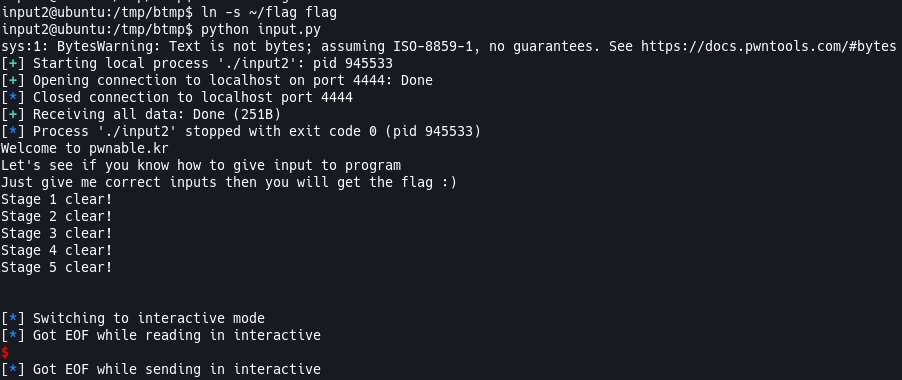
Oops, looks like I made a mistake. We didn’t need to symlink the input2 executable, but rather the flag file. But symlinking the input2 file made it easier so we didn’t have to type the full path to the executable in our code. So let’s create a symlink to the flag with ln -s ~/flag flag and now if we run the code we’ll get the flag!
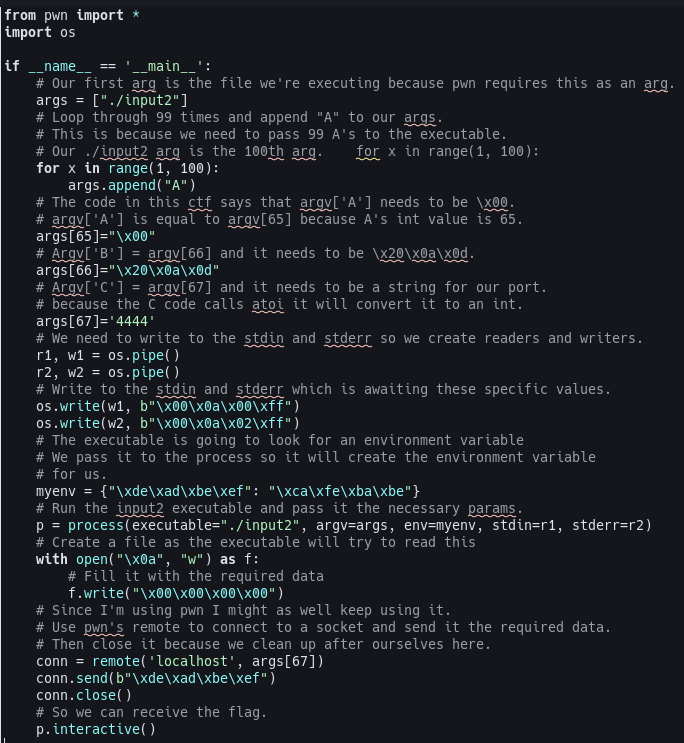
Python Script
Here is the python script. I’ve commented it so it should be easy to follow. You can find it on my github here
Secure This
This isn’t an exploit challenge, but meant to see if we understand how to pass inputs to an executable in various ways. Although there are steps here you should not follow in production code, for instance exposing environment variables in the code, or allowing a user to create a connection on your network through sockets, there is not anything specific to secure here but a good lesson in coding and reading code.