Mistake Pwnable.kr

I will be walking through the pwnable.kr CTF called “mistake” which can be found here. When clicking on the CTF (eighth one from the left - same image as the one attached to the article) you’ll see it mentions making mistakes and no fancy hacking is required, so lets dive into it.
Please remember everyone makes mistakes. Don’t be too hard on yourself, learn from them, and try your best to move on. This is an important skill to have; knowing that failure is okay, but willing to learn from it so that you can do better next time.
mistake Vulnerability
Understanding The Code
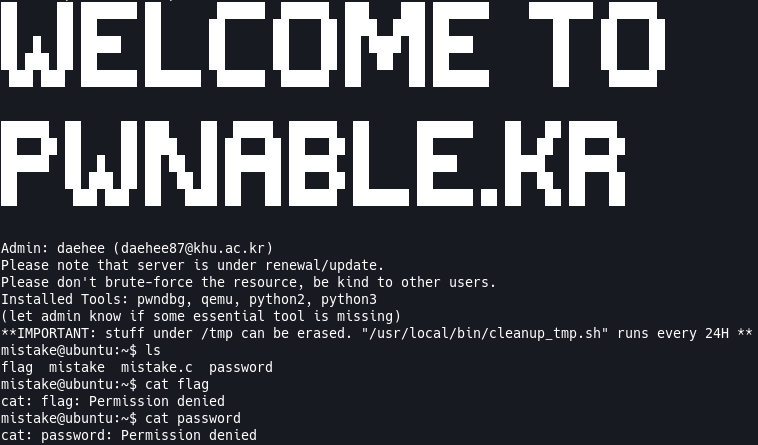
There isn’t anything mentioned that we need to learn before we jump in and look at the code, so let’s just get right to it. Following the instructions on the site we are going to ssh into the machine with the following command: ssh mistake@pwnable.kr -p2222 and once prompted provide the password provided by the CTF. Once in the machine we can run the ls command and see that we get 4 files back flag mistake mistake.c password. If we try cat flag you’ll see that we get a Permission denied error. If we try cat password we get the same Permission denied error.
Tip: It’s always good to do the obvious first, which in this case is
cat flag. Sometimes the task at hand is as easy as reading the flag so it never hurts to try the obvious first. Also good for testing any software/configuration to weed out any potential bugs.
So then we have mistake mistake.c left. mistake is the executable file compiled from the mistake.c file. So lets take a look at the mistake.c file and see what is going on in there. Here is my terminal, if you’ve been following along yours should look the same:
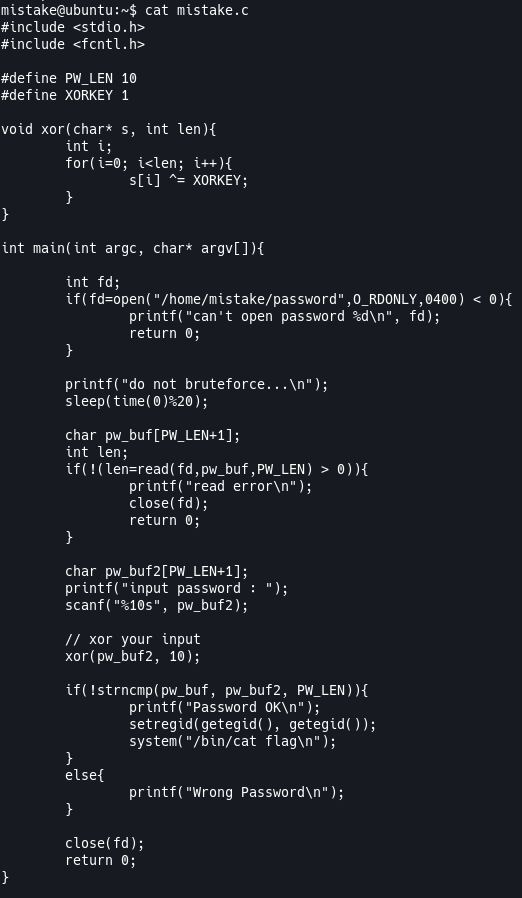
Now lets break down what’s happening in this C code. I’m not going to go over everything line by line, but I’ll point out the important parts and explain them as best as I can.
#define PW_LEN 10: This is a global definition; this means that wheneverPW_LENis used the compiler will know to substitute that with the value 10.#define XORKEY 1: This is a global definition; this means that wheneverXORKEYis used the compiler will know to substitute that with the value of 1.void xor(char* s, int len): I’m going to talk about this whole function here because this is pretty straight-forward and we’ve seen this before in my random write-up. This function is going toXORa set of characters (aka a string) based on it’s length. It will use theXORKEYwhich is 1. If you remember in C every character also has a numerical value, which in turn means it has a binary value, which allows the program toXORchars.int fd: This is just declaring an integer calledfd. Likely to be used as afile descriptorof some sort. If you’re unfamiliar withfile descriptorsyou can read my write-up on the first pwnable CTF here.if(fd=open("/home/mistake/password",O_RDONLY,0400) < 0): This line is assigning the value of opening thepasswordfile to fd and if it is < 0 then that means there was an error and we should let the user know and exit out. The interesting thing I noticed about this code immediately isif(fd=open(...))isn’t wrapped in in braces like soif((fd=open(...)))I wonder if that will be a problem.sleep(time(0)%20): This will sleep the program between 0 and 19 seconds.char pw_buf[PW_LEN+1]: This is declaring acharwith a length ofPW_LEN (10)+ 1. The+1will give the array room for a null terminator.if(!(len=read(fd,pw_buf,PW_LEN) > 0)): Read from thefdinteger declared and assigned earlier into ourpw_bufbuffer. Iflenis not> 0then alert the user of the error and exit out. I see the same issue here from the earlierifcheck offd=open(...)where the assignment isn’t wrapped in().char pw_buf2[PW_LEN+1]: Declare a second buffer - the same as we did forpw_buf.scanf("%10s", pw_buf2): Read 10 characters from the user input and place it intopw_buf2.xor(pw_buf2, 10):XORthe input by the user sopw_buf2will now be equal to theXORvalue.if(!strncmp(pw_buf, pw_buf2, PW_LEN)): Ifpw_bufandpw_buf2are equal then the program will print the flag for us.
What We Know
Now that we understand the code, what do we know?
- There is a mistake somewhere in the code. It could be at
if(fd=open("/home/mistake/password",O_RDONLY,0400) < 0)orif(!(len=read(fd,pw_buf,PW_LEN) > 0))but I am unsure. - It will take user input that will need to match the password in the
passwordfile after user input is run throughXOR.
I Needed Help
Looking at the code above I saw that there might be an issue with if(fd=open("/home/mistake/password",0_RDONLY,0400) < 0) because I believe when assigning to a variable in an if we need to wrap that in () so the assignment happens first, but I am unsure about that. I don’t usually do assignments in if checks, but I do wrap my code that I want executed first in () inside an if check. When I executed the code I saw that the sleep(time(0)%20) was hanging, so something funky was going on. When I did research I found something called “Operator Precedence”. Think of Operator Precedence as BEDMAS/PEDMAS in math, certain operations happens before others no matter where they are in the equation. You can find the rules of Operator Precedence here and a huge shout-out to Jamie Lightfoot who explained Operator Precedence here. So, looking at the Operator Precedence page we see that a function call has a precedence of 1 which means our open("/home/mistake/password",0_RDONLY,0400) will resolve first, this means that will return a 1 because the password file exists and it can be read. The next step in Operator Precedence is the comparison of 1 < 0, because this holds a precedence of 6, and because 1 is not less than 0, that will result in 0. This means that the final sequence will be fd=0, because assignment has the second lowest precedence, which means when if(!(len=read(fd,pw_buf,PW_LEN) > 0)) is called it is reading from the stdin. This means we can control the password because whatever we input we can XOR against 1 and provide that as our user input and that should give us the flag.
Nobody knows everything so getting help is always an option, don’t let anyone tell you otherwise. When it comes to finding solutions to problems, or hints, make sure you understand what’s happening and how that conclusion was found.
The Flag And How To Get it
As mentioned above we control the password since it is filling the buffer based on what we provide to the stdin and if we run whatever string we input against a XOR calculator we can provide the password. A site I love to use for XOR and many other conversions is CyberChef. On the left-hand side if you search “XOR” and drag it into the Recipe portion of the site you should see a green rectangle which will allow you to input a KEY and select it’s type. If you put 1 into the KEY portion and select the HEX drop-down and change it to DECIMAL that should be all you need.
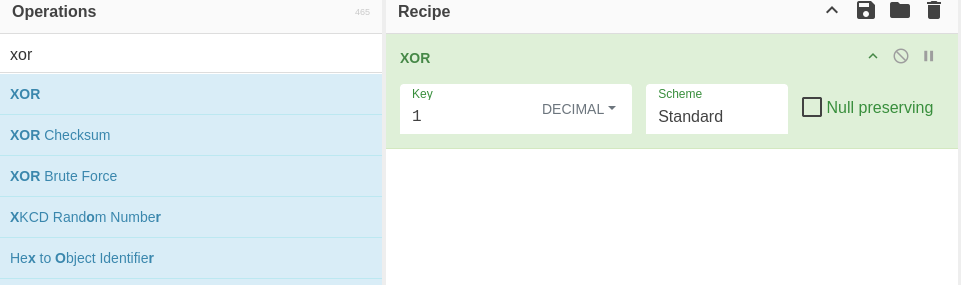
With that in place on the right-hand side under INPUT if we type in BBBBBBBBBB under OUTPUT you’ll see CCCCCCCCCC. So if we provide the executable with 10 B characters before it asks for our input, we can then provide 10 C characters when asked for our input. Let’s give it a shot and see what happens.
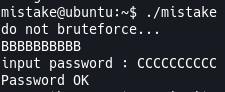
I’ve removed the flag, so go out there and get the flag yourself!