File Descriptor Pwnable.kr

I will be walking through the pwnable.kr CTF called “fd” which can be found here. When clicking on the CTF (first one from the left - same image as the one attached to the article) you’ll see it mentions “File Descriptor”. What is a file descriptor?
Before We Get The Flag
What Is A File Descriptor
Before we start we need to know what a file descriptor is otherwise solving this CTF will be a challenge. As someone in cybersecurity you should be familiar with file descriptors as you’ll be using them often. In Unix-like systems there is a philosophy that “everything is a file” which will make file descriptors easier to understand. A file descriptor is an unsigned integer used by the OS to identify an open file. So for every n file open there will be n number of entries in the kernal’s file descriptor table. When a file is opened the kernal will add an entry to the file discriptor table which is a representation of the opened file and will hold data about the file. File descriptors are often assigned in sequential order and whenever a file is opened it will be assigned the next available file descriptor starting at 3. Every process opened on a Unix-like system will start with a default descriptor inherited by the shell. These default descriptors are:
- 0: This is used for the standard input (stdin).
- 1: This is used for the standard output (stdout).
- 2: This is used for the standard error (stderr).
Tip: To learn more about file descriptors and their exploits I suggest reading this which goes over a talk about a file descriptor vulnerability given at Blackhat USA 2022!
File Descriptors And Ethical Hacking
As mentioned previously file descriptors and knowing how to use them or redirect them is a part of exploiting, ethical hacking, and overall working in Linux. One common use of file descriptors is using Linux’s find command. If want to run a command to find a directory named fun, you’d run this: find / -type d -name 'fun'. This command is going to look in the root folder hierarchy for a directory called fun and return any findings. The problem with this command is that it will print out permission denied when trying to access folders your account doesn’t have the appropriate access to, which in secure, or somewhat secure systems, will be a lot and it’s going to be overwhelming in the output. One way to deal with this is using the shell’s default file descriptors. Since we know this permission denied is an error we can redirect any error output into the void (some call it a black hole or data sink) with the following command: find / -type d -name 'fun' 2>/dev/null. What this command does now is:
find /: Call the find command and start at root.-type d: The type we are searching for is a directory.-name 'fun': The name of the folder is fun.2: As discussed above this is accessing the stderr file descriptor in Linux.>: This is letting the OS know we want to redirect the output we specified previously, so in our case the stderr./dev/null: This is the void, black hole, or data sink. This is a null device file that immediately discards any data written to it and will return End-Of-File(EOF) on read.
This is just the tip of the iceberg and what file descriptors can help you acomplish when it comes to ethical hacking and exploiting development.
fd Vulnerability
Understanding The Code
Now that we’re familiar with file descriptors we can move on to working on this CTF. Following the instructions on the site we are going to ssh into the machine with the following command: ssh fd@pwnable.kr -p2222 and once prompted provide the password provided by the CTF. Once in the machine we can run the ls command and see that we get 3 files back fd fd.c flag. If we try cat flag you’ll see that we get a Permission denied error.
Tip: If you type
cat flag 2>/dev/nulllike we discussed in the previous section you’ll see that you get no feedback which means we’ve successfully redirected the error output into the void!
So we cannot get the flag the old fashioned way, but what fun would that be if we could? So then we have fd fd.c left. fd is the executable file compiled from the fd.c file. So lets take a look at the fd.c file and see what is going on in there.
Tip: If you are unfamiliar with C I would recommend you invest some time to learn it. Coding will give you an upper hand when it comes to ethical hacking and exploitation!
Tip: When working with C code something that will come up often are
pointers. Apointeris a variable that stores the memory address of another variable. One use of pointers allows us to reference the object rather than copying it through code. This allows us to save overhead by referencing the value directly instead of having the program copy it, change it, and pass it back. This is just one example of pointers and their use and this is the simplest and quickest explanation. I would suggest diving into pointers and learning them as they are interesting and crucial for binary exploitation and reverse engineering. Here is an example of copying vs referencing:
Here is my terminal, yours should look the same if you’ve been following along. 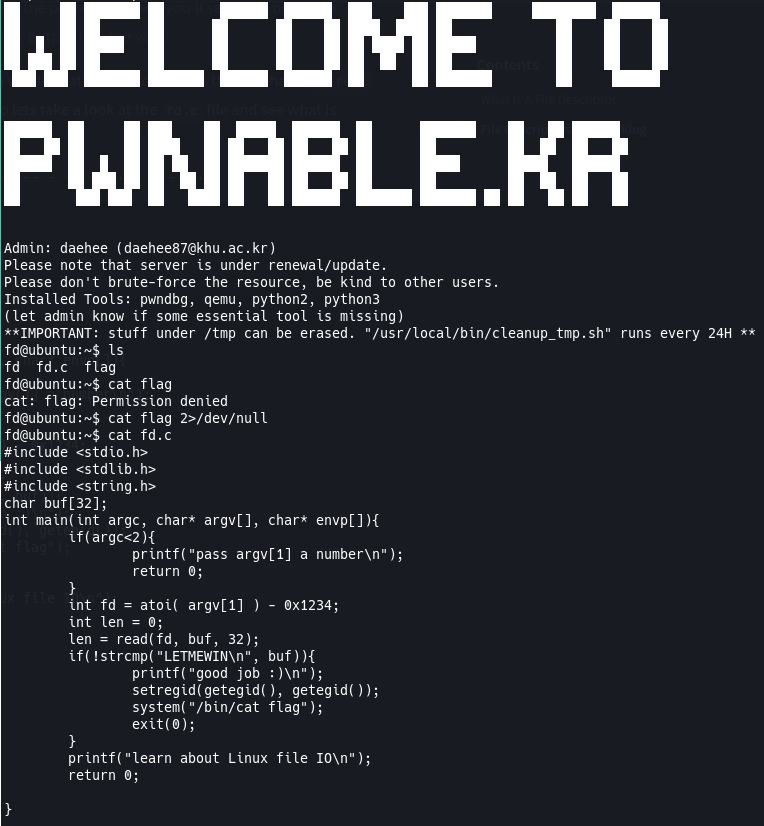
Now lets break down what’s happening in this C code. I’m not going to go over everything line by line, but I’ll point out the important parts and explain them as best as I can.
char buf[32];: This is allocating 32 bytes of data for this array of characters. The way this is initialized means it is empty to start and will likely be populated later and because it’s initialized outside of themainfunction this means it can be accessed globally throughout the file.int main(int argc, char* argv[], char* envp[]): This is the entry point of the program which means the system will call this function first when running this compiled program. In this case this function is anintwhich means it will require a return to let the user know of it’s status. 0 is usually used for success (as in the program successfully ran).int argc: This is the number of arguments passed to the program when running it. This number is always at least 1 because when calling the program itself it will count as an argument. You’ll see this when we run the program later.char* argv[]: This is an array of unspecified size where each element of the array contains a pointer to a character.char*is how C handles strings (which is just a sequence of characters with a null\0terminator). This will store the supplied arguments when running the program. This will always have at least 1 entry because, again, calling the program itself counts as an argument.char* envp[]: This is an optional argument used in main. This is an array of unspecified size where each element of the array contains a pointer to a character (as stated above, this is an array of strings in C, essentially). This will store any environment variables supplied to the program in the format ofNAME=value. For this challenge, we won’t be using this.
if(argc<2): This is an if block that is checking if we’ve supplied additional arguments when running the program beyond the name of the program. If we haven’t, it will provide the user feedback via theprintffunction and let us know we need to supply another arugment, which in this case is a number. It will then return 0 to let the function know to stop there successfully.int fd = atoi( argv[1] ) - 0x1234;: This is assigning the variable offdto the difference of the subtraction after it.atoi( argv[1] ): This is calling a C standard library function to convert a string to an integer. For example if we were to supply this program with1234when we run it, it will be parsed as a string. This function takes that string and converts it to a number that we can do mathematical operations with. Alternatively, if we supplied23 Jordanit will return23because that is the first number it found in the supplied string.0x1234: This is a hexidecimal number. Hexidecimals are often used in exploitation and ethical hacking for payloads or obfuscation. You can use python and callprint(0x1234)or use an online converter to convert0x1234to a decimal number and you should get4660.
len = read(fd, buf, 32);: This is calling the Cread()function and assigning the value to len. This function takes 3 arguments in the following formatread(int fd, void *buf, size_t count). Let’s break it down:int fd: The first argument is a valid file descriptor to read from. If you look at the code you’ll see this is the difference of our argument supplied when we run the program and4660.void *buf: This is the buffer that will get populated with the data read from the file descriptor. This will be ourchar buf[32]variable we declared earlier.size_t count: This is the maximum number of bytes to read into our buffer. For us it is 32 because we declaredchar buf[32]before our main function.
if(!strcmp("LETMEWIN\n", buf)): This is another if block to check if two strings are equal. The!is checking if the function called is returning0orfalse, in this case if the strings are equalstrcmpreturns 0 so we need to do!strcmp(...). This is checking if"LETMEWIN"andbufare equal, if they are then we go into this if block and run the subsequent code.setregid(getegid(), getegid());: This function is setting the real and effective group ID (setregid) to the program’s effective group ID (getegid()). Esentially it’s getting the ID used by the kernal for permission checks and setting it to that effective ID which will mean any system commands (thinkcat) will be run as if any user who ran this script is the code owner.system("/bin/cat flag"): This is calling Linux’scatcommand to read the flag file for us. It’s able to do this because of the permissions function call before this.exit(0): Exit the program safely because we’ve got what we need.printf("learn about Linux file IO\x");: This is giving us feedback to let us know we’ve failed the task if the if block above is not hit (meaning ourbufvariable is not equal toLETMEWIN).return 0: This is letting the program know to stop the function. As explained before, our function is an integer which means it requires a return to end. We return 0 as that is standard when the program has successfully ran.
What We Know
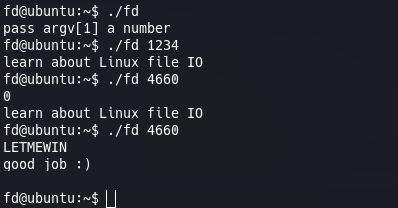
Now that we understand the code and are familiar with file descriptors lets see if we can find the vulnerability with this and get the flag. First lets run the program and see what happens. We can use ./fd to run the compiled C code. Running it without passing any arguments will result in the feedback we saw when analyzing the code pass argv[1] a number. So if we run ./fd 1234 we get the other feedback log of learn about Linux file IO, great so we can run the file. So, what do we know?
- We know that default file descriptors are inherited from the parent process (in this case our shell where we ran the
./fdprogram from). - We know that this program is taking our input and subtracting it from
0x1234which is4660when converted from hexidecimal to decimal. - We know that the
read(...)function takes a file descriptor as it’s first argument. - We know that the default file descriptors are assigned to
0 (stdin) 1 (stdout) 2 (stderr).
So what happens if we pass 4660 to our program when we run it? Interesting, our terminal is waiting for input. What happens if we type 0? Looks like we get the learn about Linux file IO feedback.
The Vulnerability And Why It Works
But where is the vulnerability or flaw? Without doing some research it might not be straight-forward or maybe I’ve done a decent job at explaining and you’ve seen where I’ve been pointing to. If you remember the code, what’s happening is that we’re in the read(...) function when our terminal is waiting for our input. The flaw that leaves this program attacker-controlled is in the read(...) function because it lets us control the file descriptor passed to the function when we pass an argument to our file. The reason this works is because, if you remember from above, Linux automatically inherits the default file descriptor integers from the shell because we ran the ./fd compiled program! So when the read(...) function gets passed 0 (for stdin) that means it’s waiting for input from our terminal to populate our buf variable inside the read() function! So when the terminal is waiting for our input if we type LETMEWIN it will assign that to the buffer, which then will run the if(!strcmp("LETMEWIN", buf)) which will return 0 (which in the case of strcmp means true) and allow the program to spit back the flag for us! I’ve removed the flag from the screenshot below, so go get that flag and submit it on pwnable!
Secure This
The intention of this CTF was to explicitly exploit the file descriptor to supply the LETMEWIN string. One way to secure this code would be to only allow the user to use default file descriptors of 0 1 2, with the way the code is now, if a user were able to get a file descriptor of an open file/process they could use that in the read(...) function and potentially gain access to the system that way. Now I’m not the best hacker, hell, I’m not even a good hacker, but I tried to see if I could get a valid file descriptor to exploit that but was unable to. Still, something to be mindful of when coding securely!