Random Pwnable.kr

I will be walking through the pwnable.kr CTF called “random” which can be found here. When clicking on the CTF (fifth one from the left - same image as the one attached to the article) you’ll see it mentions being taught how to use random, this should be interesting.
The Vulnerability And Why It Works
Before We Get The Flag
Random In C
Calling rand() in C allows our program to generate pseudo-random numbers. This means these numbers are produced by a deterministic algorithm and it’ll return a value between 0 and RAND_MAX. RAND_MAX varies between compilers and it’s at least 32, 767. By default rand() uses a fixed seed of 1. This means if we call rand() and run the program 100 times, the number will be the same. To counteract this behaviour you’d need to use srand() with an argument that changes every time the program is run, a good one is to use time itself. So you would call srand((unsigned) time(NULL)). time(NULL) returns the time that has elapsed since the Unix epoch which is 00:00:00 January 1st 1970 as a time_t type. We need it to be a positive number so we type cast it to unsigned, also srand() only accepts an unsigned value.
random Vulnerability
Understanding The Code
Now that you’re familiar with how rand() works in C we can move onto working on this CTF. Following the instructions on the site we are going to ssh into the machine with the following command: ssh random@pwnable.kr -p2222 and once prompted provide the password provided by the CTF. Once in the machine we can run the ls command and see that we get 3 files back flag random random.c. If we try cat flag you’ll see that we get a Permission denied error.
Tip: It’s always good to do the obvious first, which in this case is
cat flag. Sometimes the task at hand is as easy as reading the flag so it never hurts to try the obvious first. Also good for testing any software/configuration to weed out any potential bugs.
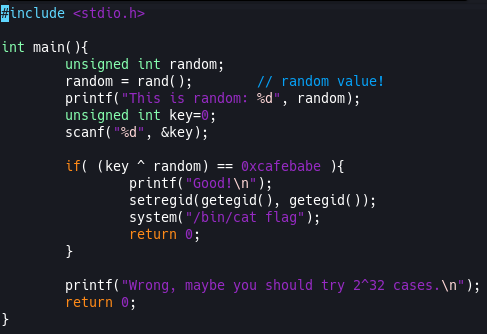
So then we have random random.c left. random is the executable file compiled from the random.c file. So lets take a look at the random.c file and see what is going on in there. Here is my terminal, if you’ve been following along yours should look the same: 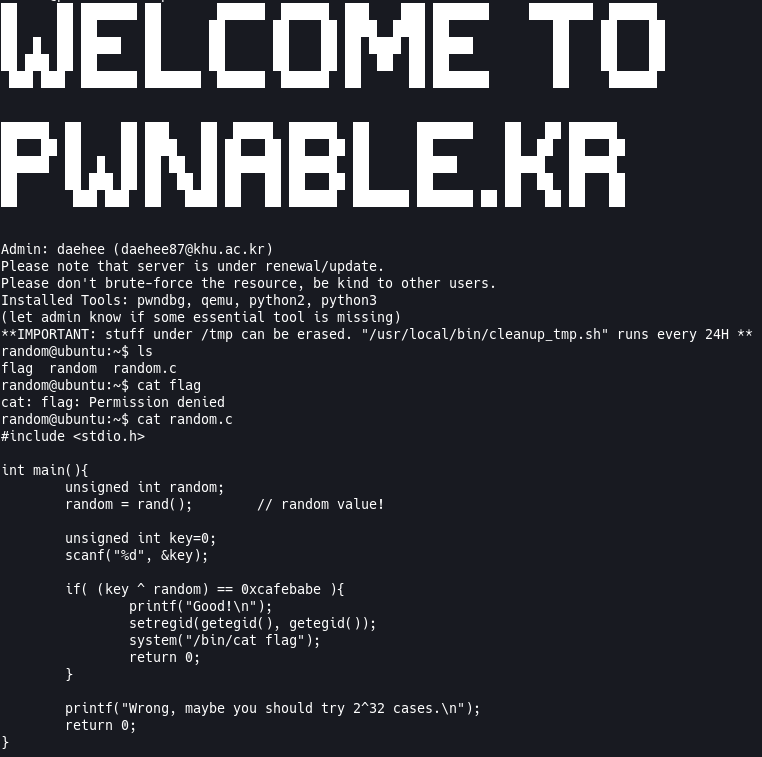
Now lets break down what’s happening in this C code. I’m not going to go over everything line by line, but I’ll point out the important parts and explain them as best as I can.
unsigned int random: Just declaring a positive-only integer by the name of random.random = rand() // random value!: This is setting ourrandomvariable to the value ofrand().unsigned int key=0: Initializing a positive-only key variable to 0.scanf("%d", &key): Getting input from the user and putting it into ourkeyvariable.if( (key ^ random) == 0xcafebabe): This is checking if theXORvalue of user input ofkeyand therandomvariable are equal to0xcafebabe.XORstand forExclusive ORand is an operation that will output true or 1 when the inputs differ. For example101 ^ 111 = 010the reason our answer only has one1value is because0^1is equal to1because the inputs differ. That’s the simplest explanation I can offer, I suggest you do some reading if you need a better understanding here!
What We Know
Now that we understand the code and understand rand() in C we can try to figure out how to extract the flag. What do we know?
rand()uses a seed of 1 ifsrand()is not utilized to change that seed. This means that therandomvalue in the above code will always be the same.- We know how
XORworks and that we needinput ^ random = 0xcafebabe.
With this information we can get the flag. We aren’t going to use gdb for this task, but we will need to copy this script over to the /tmp folder to see if the rand() seed is indeed 1.
The Vulnerability And Why It Works
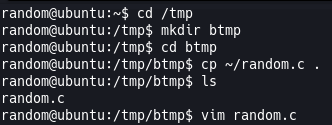
First let’s copy the random.c file to a folder in the /tmp location. The reason we need to do this is because we need to edit the script to add a printf to see if our random is indeed the same every time we run it. So first we’ll do cd /tmp and I like to create another folder in there so I’ll do mkdir btmp and then cd btmp. Great, now that we’re in here we need to copy the random.c file into this folder so we can do cp ~/random.c . and we can do ls to confirm the file is here, which it is, great! Now we need to edit this file, I like using VIM so I’ll do vim random.c. If you’re using vim, what you’ll do is use your arrow keys to navigate to the line below random = rand(). Once there you can press i to enter insert mode and then tab/space until your cursor is aligned with the line above and type printf("This is random: %d\n", random);. Once you have that you can press ESC and then type :wq and that will save and quit the file. Now we can compile it and run it to see what our value of random is.
Now we need to compile this code. We’ll do that with gcc random.c -o random which is just calling the GNU Compiler Collection and telling it to compile random.c and output to random. Now we can run ./random and see what result we get back. Once you run it the executable will await your input, just input any value and let’s run it 3 times to make sure.
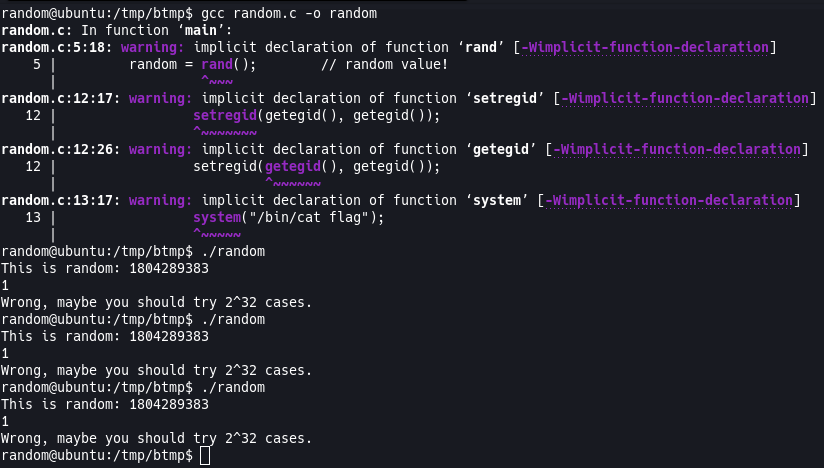
So it turns out our explanation of rand() was correct and it is indeed using a seed of 1 which means the number is always the same. The number we have is 1804289383 which means we’ll be able to find the value we need to supply to the executable to get our flag. I’ll use python for this, but you can do it manually or any way you please. Since we have our “random” value as an integer, we can print out 0xcafebabe as an integer too so we know it’s value and then we can do random ^ 0xcafebabe and that will give us the value we need to supply to our executable. Here it is in python:
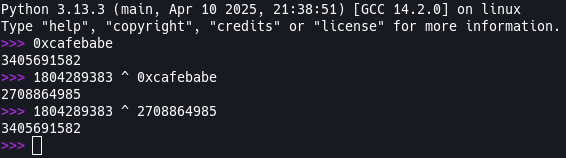
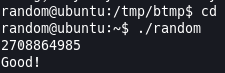
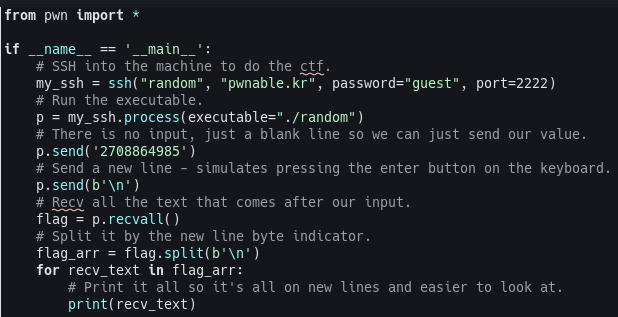
So the value we need to supply to our executable is 2708864985. We can just run the executable and pass it 2708864985 when we are prompted and it will spit the flag back out. We can also do this with a python scrpt which I will also showcase, but now that you have the value go out and get that flag! Make sure you cd back to where the original script is!
Python Script
Here is a python script that will do all the work for you. I’ve commented it so it should be easy to follow. You can find it on my github here
Secure This
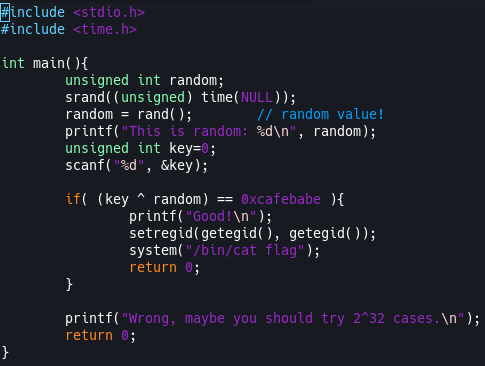
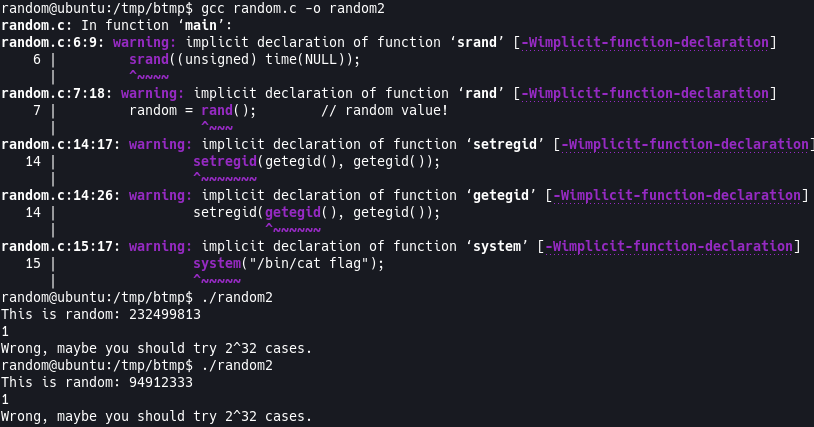
Again, I know the purpose of this challenge is to teach us and to explain how rand() is not a true way to represent randomness, but to make sure you’re getting a random value, make use of the srand((unsigned)time(NULL)) function call before using rand(). Here is the code using srand(..) and running it showing the number is different every time.